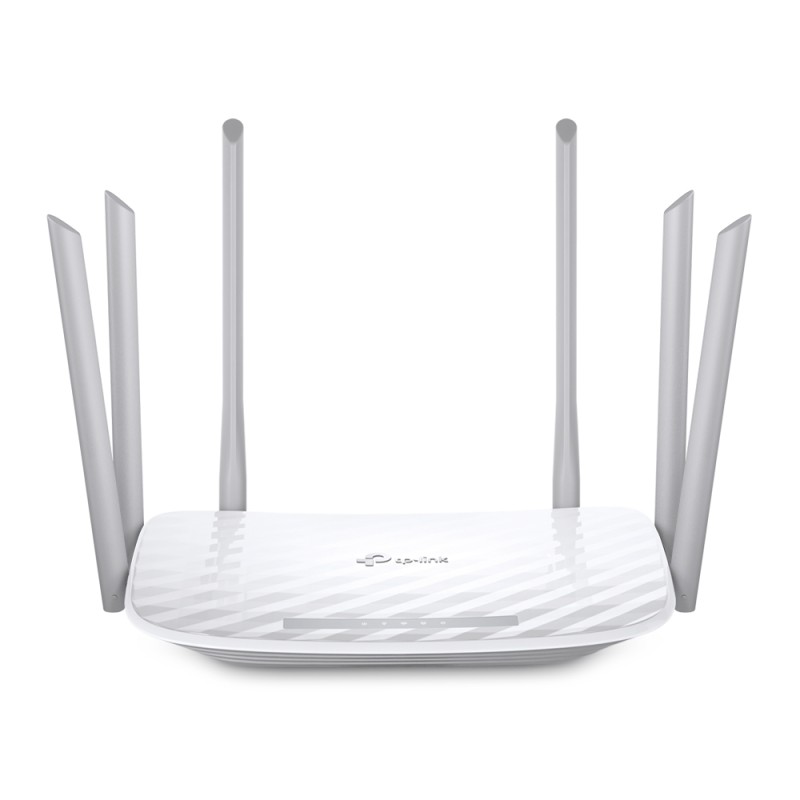


TPLINK AC1900 MU-MIMO Wi-Fi Router
Warranty: Manufacturer warranty
 Reserve now, pay later
No payment at checkout: we confirm stock, then you pay by PesaPal, bank transfer or cash
 Collection or delivery in 3 days
16 Zanaki Street or delivered — within 3 working days of payment
 Genuine, with warranty
Manufacturer warranty, supported by our own technicians
TPLINK AC1900 MU-MIMO Wi-Fi Router
Where these differ from the configuration described above, the configuration above is what you receive.
AC1900 Wireless MU-MIMO Wi-Fi Router
| Standards and Protocols | Wi-Fi 5 IEEE 802.11ac/n/a 5 GHzIEEE 802.11n/b/g 2.4 GHz |
| WiFi Speeds | AC1900 5 GHz: 1300 Mbps (802.11ac)2.4 GHz: 600 Mbps (802.11n) |
| WiFi Range | 3 Bedroom Houses 6× Fixed High-Performance AntennasMultiple antennas form a signal-boosting array to cover more directions and large areasBeamformingConcentrates wireless signal strength towards clients to expand WiFi range |
| WiFi Capacity | Medium Dual-BandAllocate devices to different bands for optimal performance3×3 MU-MIMOSimultaneously communicates with multiple MU-MIMO clientsAirtime FairnessImproves network efficiency by limiting excessive occupation |
| Working Modes | Router ModeAccess Point Mode |
| Network Security | SPI FirewallAccess ControlIP & MAC BindingApplication Layer Gateway |
| Guest Network | 1× 5 GHz Guest Network1× 2.4 GHz Guest Network |
| WiFi Encryption | WPAWPA2WPA3WPA/WPA2-Enterprise (802.1x) |
| Ethernet Ports | 1× Gigabit WAN Port4× Gigabit LAN Ports |
| Power | US Version12 V ⎓ 1.5 AEU Version12 V ⎓ 1 A |
| Buttons | WPS/Wi-Fi ButtonPower On/Off ButtonReset Button |
| Protocols | IPv4IPv6 |
| EasyMesh | Mesh networking creates smooth, fast, stable roaming. Archer C86 can build an EasyMesh network with devices that use EasyMesh technology. It also works with other TP-Link products to create a OneMesh network. Eliminate Wi-Fi dead zones, expand your network, and fill your entire home with high-speed Wi-Fi. Learn More> |
| Parental Controls | URL FilteringTime Controls |
| WAN Types | Dynamic IPStatic IPPPPoEPPTPL2TP |
| Quality of Service | QoS by Device |
| Cloud Service | OTA Firmware UpgradeTP-Link IDDDNS |
| NAT Forwarding | Port ForwardingPort TriggeringDMZUPnP |
| IPTV | IGMP ProxyIGMP SnoopingBridgeTag VLAN |
| DHCP | Address ReservationDHCP Client ListServer |
| DDNS | TP-LinkNO-IPDynDNS |
| Management Features | Tether AppWebpage Check Web Emulator> |
| Network Services Enabled by Default | Web Server Manage and configure device through web (HTTP/HTTPS) • Port: 80/443 Protocol: TCP DNS DNS • Port: 53 Protocol: TCP & UDP DHCP Server IP address assignment (DHCP) • Port: 67 Protocol: UDP App management Manage and configure device through app • Port: 20002 Protocol: UDP Alexa service Detect Alexa-enabled devices in the LAN • Port: 5353 Protocol: UDP |
| System Requirements | Internet Explorer 11+, Firefox 12.0+, Chrome 20.0+, Safari 4.0+, or other JavaScript-enabled browserCable or DSL Modem (if needed)Subscription with an internet service provider (for internet access) |
| Certifications | FCC, CE |
| Environment | Operating Temperature: 0℃~40℃ (32℉ ~104℉)Storage Temperature: -40℃~70℃ (-40℉ ~158℉)Operating Humidity: 10%~90% non-condensingStorage Humidity: 5%~90% non-condensing |
| WiFi Transmission Power | CE:<20dBm(2.4GHz)<23dBm(5.15GHz~5.25GHz)FCC:<30dBm(2.4GHz & 5GHz) |
| WiFi Reception Sensitivity | 5GHz:11a 6Mbps:-98dBm, 11a 54Mbps:-78dBm11ac VHT20_MCS0:-98dBm, 11ac VHT20_MCS8:-72dBm11ac VHT40_MCS0:-92dBm, 11ac VHT40_MCS9:-68dBm11ac VHT80_MCS0:-89dBm, 11ac VHT80_MCS9:-64dBm2.4GHz:11g 6Mbps:-97dBm, 11a 54Mbps:-77dBm11n VHT20_MCS0:-97dBm, 11n VHT20_MCS8:-72dBm11n VHT40_MCS0:-92dBm, 11n VHT40_MCS9:-67dBm |
| Dimensions (W×D×H) | 9.1 × 5.1 × 1.5 in(229.9 × 144.2 × 37.2 mm) |
| Package Content | Wi-Fi Router Archer C86Power AdapterRJ45 Ethernet CableQuick Installation Guide |
Source: manufacturer product page
Data sheet
Specific References
TPLINK AC1900 MU-MIMO Wi-Fi Router
Warranty: Manufacturer warranty